
Ace Combat 8 Review: Performance, Graphics and the Best Version to Play
Ace Combat 8 succeeds because its aerial combat, mission design, characters and music work together. Project Aces has preserved the series’ identity while making its environments more convincing, its squadmates more memorable and its skies more interesting to navigate.
It is also a game with clear technical compromises. PS5 Pro offers the strongest console experience, base PS5 and Xbox Series X deliver generally smooth combat, and Xbox Series S makes substantial sacrifices. PC adds welcome ultrawide support, but performance demands and reported stability problems complicate the recommendation.
The result is an excellent aerial-action campaign whose best qualities shine during flight, even when image clarity and cinematic frame rates fall short.
Quick Summary
- PS5 Pro delivers the strongest console experience, while Xbox Series S sacrifices both visuals and gameplay performance.
- Nanite reduces distracting terrain pop-in, and volumetric clouds contribute directly to flight and mission design.
- PC adds extensive ultrawide support, but demanding performance and reported stability issues warrant hardware-specific checks.
- Music, squad dialogue and character presentation make the campaign more than a graphical showcase.
Is Ace Combat 8 Worth Playing?
Yes, particularly for players who value dramatic aerial combat and a campaign driven by music, radio dialogue and direct action. Its appeal is not simply the quality of individual aircraft models or the scale of its scenery. It is how those elements support the experience of pursuing an enemy, banking through clouds and responding to a battle unfolding around you.
The familiar rhythm remains central: maneuver your aircraft, acquire targets and fight through a campaign. Ace Combat 8 improves that foundation without abandoning what makes the series distinctive.
A stronger connection to your squad
Characters are better integrated into both the story and the missions. Radio chatter still carries much of the drama, but close-up character presentation and portraits during flight give those voices a clearer identity.
That matters in a game where dialogue often accompanies demanding action. Squadmates feel more like a recognizable cast rather than voices delivering objectives. Strong voice acting and in-mission banter reinforce that connection.
The campaign can create the intensity associated with elaborate scripted set pieces while leaving the important action in your hands. Its strongest moments come from flying and fighting, not simply waiting for a cinematic to finish.
Clouds change the experience of flying
The volumetric cloud system, developed with Q-Games, is one of the most meaningful improvements. Cloud formations are not just a backdrop. Some stages use them as a major part of their spatial design, giving you formations to fly through, around and between.
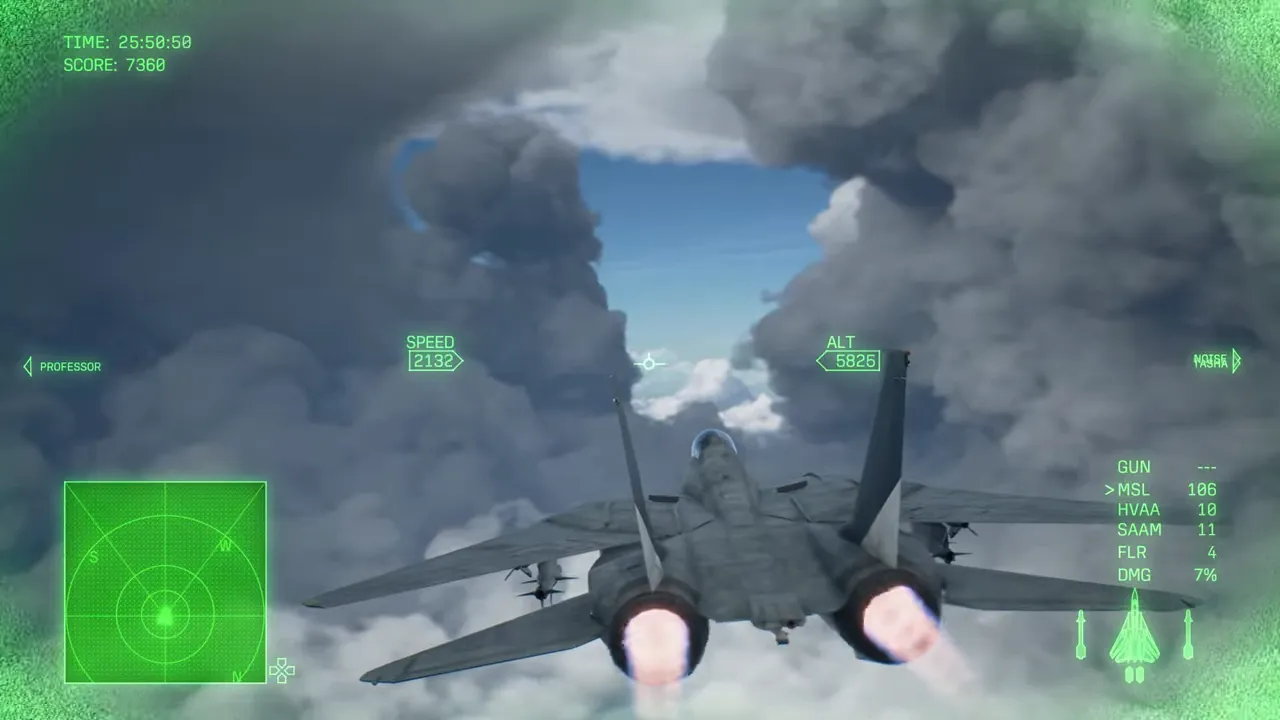
Nearby clouds also strengthen the sensation of speed. At high altitude, distant terrain can make a fast aircraft appear to move slowly. Passing close to large cloud formations supplies a much clearer reference for motion.
The system supports varied cloud shapes with relatively restrained noise. Combined with the lighting and art direction, it makes the sky an active part of the experience rather than empty space above the terrain.
Which Version of Ace Combat 8 Should You Play?
The platform differences are significant enough to influence a purchase. The key distinction is between performance during combat and performance during cinematics and hangar sequences. A version that struggles in the latter can still run smoothly once a mission begins.
| Platform | Gameplay performance | Main visual compromises | Recommendation |
|---|---|---|---|
| PS5 Pro | Mostly stable 60fps in performance mode, with occasional minor dips | Performance-mode pixel counts around 1080p in sampled shots, though cleaner than base consoles | Best overall console choice |
| PS5 | Generally close to 60fps, slightly less stable than Pro | Sampled performance-mode resolutions varied from approximately 720p to 1080p | A strong option for smooth combat |
| Xbox Series X | Mostly reaches 60fps, with more noticeable gameplay drops than PS5 | Soft image quality and variable resolution | Good overall, despite occasional dips |
| Xbox Series S | Unlocked and frequently closer to 30fps than 60fps | Sampled resolution no higher than 720p, reduced textures and no Lumen | Avoid if a stronger platform is available |
| PC | Demanding, with cinematic drops even on the high-end system tested | Results depend on hardware and settings; some users report technical problems | Appealing for ultrawide displays, but check hardware-specific results |
These resolution figures describe sampled scenes, not guaranteed fixed resolutions. Likewise, mostly reaching 60fps does not mean an uninterrupted lock across the entire campaign.
PS5 Pro: the strongest console balance
PS5 Pro delivers largely stable 60fps gameplay in performance mode. Its image also looks noticeably cleaner in motion than the base-console versions, despite sampled pixel counts landing around 1080p.
Its advantage extends to demanding cinematic sequences. In the comparisons, Pro typically ran about 10fps ahead of Xbox Series X. That is a useful improvement, but not enough to make those sequences consistently reach 60fps.
PS5 versus Xbox Series X
The base PS5 generally holds close to 60fps during missions, with occasional small drops. Xbox Series X also mostly reaches that target, but its gameplay dips can be more pronounced.
The order changes in Lumen-enabled cinematics: Series X performs a little better than base PS5. Neither is especially stable there, so the most useful buying distinction is that PS5 has the slight gameplay-performance advantage, while Series X handles some demanding cinematic scenes better.
Why Xbox Series S is difficult to recommend
Series S compromises both presentation and responsiveness. Its sampled resolution did not exceed 720p, textures are often lower resolution, and Lumen lighting is absent from cinematics and the hangar. There are no alternative graphics modes to select.
Despite those reductions, gameplay frequently runs near 30fps with an unlocked frame rate. Its cinematic performance can resemble Series X, but that similarity does not carry over to the quality of the overall experience.
If you can choose another platform, Series S is the weakest way to experience the game’s detailed environments and fast aerial combat.
Performance Mode or Quality Mode?
Performance mode is the sensible starting point for combat. On the stronger consoles, it provides generally smooth flight at or near 60fps, which better supports rapid turns and target tracking.
Quality mode offers higher resolution and a visibly clearer image, particularly on PS5 Pro. The trade-off is an unlocked, inconsistent frame rate rather than the steadier presentation available in performance mode.
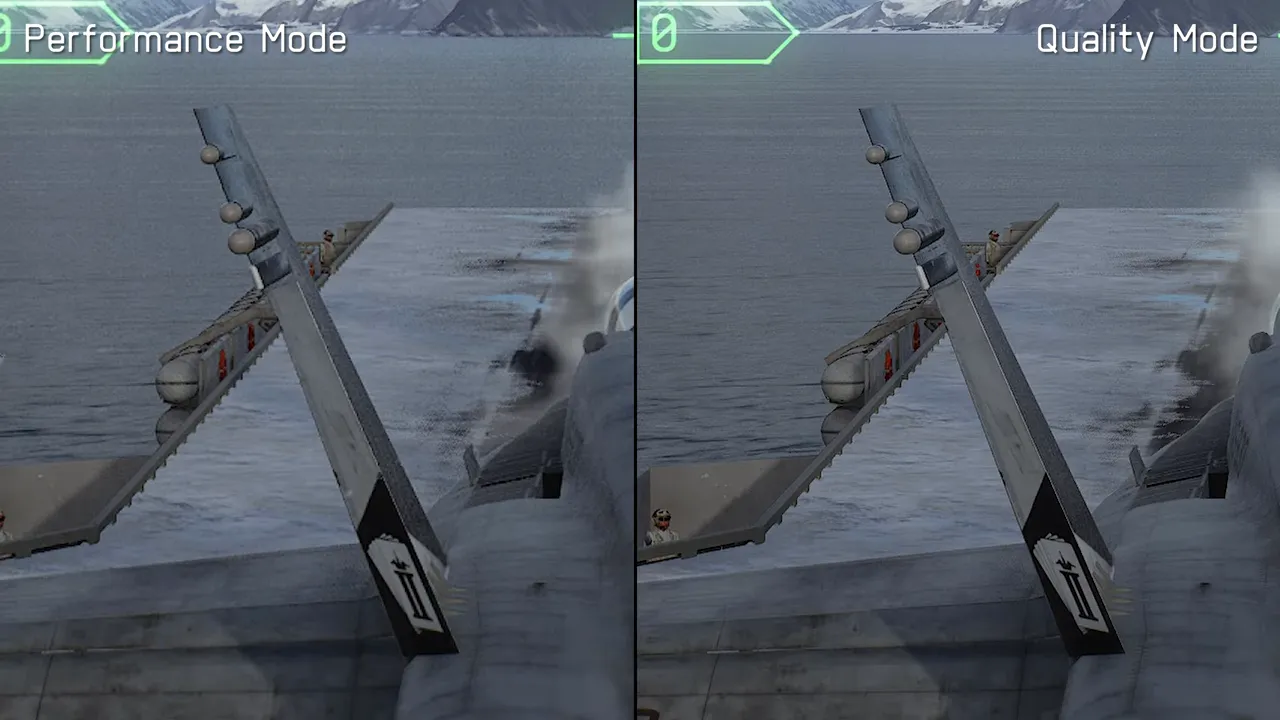
The choice is therefore not simply between good and bad graphics. It is between sharper scenery and more consistent movement:
- Choose performance mode if responsiveness and smooth flight are your priorities.
- Try quality mode if image sharpness matters more to you and you tolerate frame-rate variation.
- Do not expect mode selection on Series S. That version has no graphics-mode choice.
VRR helps, but has limits
The PS5 versions support variable refresh rate without needing to force support for unsupported games in the console settings. However, their 60Hz VRR implementation does not cover frame rates below 48fps.
That limitation matters during cinematics, where performance can fall beneath the supported range. VRR can reduce the visibility of some fluctuations, but it cannot smooth every demanding scene.
Xbox allows VRR to be forced across games with low frame rate compensation, making those fluctuations less problematic on a compatible display. It still does not eliminate the underlying performance differences between platforms.
PC Performance, Ultrawide Support and HDR
A demanding PC release with reported problems
The PC graphics menu offers a reasonably broad selection of settings, but the available testing was limited to a high-end system. That is not enough to establish reliable expectations for specific midrange or lower-end configurations.
Even on that system, some cinematics dropped below 60fps. Separate user reports included shader compilation repeating at every launch, crashes after certain missions and performance difficulties on lower-end hardware.
Those reports should not be treated as universal faults. They do mean that a powerful PC alone is not a guarantee of an entirely smooth experience. Check results for hardware similar to yours rather than relying on a general claim that the PC version runs well.
Ultrawide is a major improvement over Ace Combat 7
PC display support is a clear step forward. Ace Combat 8 supports 21:9 across gameplay, menus and even some pre-rendered material. Gameplay also supports 32:9, although menus and cinematics remain limited to 21:9.
The remaining restriction is HUD placement. Interface elements stay within a central 16:9 area, with no option to rearrange them across the wider display.
Even with that limitation, ultrawide support is a substantial improvement over Ace Combat 7 and a strong reason to consider PC if you already use a suitable monitor.
HDR is worthwhile, but inconsistent
All versions support HDR. It can produce preferable results to SDR, but its implementation is not entirely convincing.
The default ACES tone mapper and differences in color grading create an inconsistent appearance when switching between SDR and HDR. Adjustment can produce satisfying results, but this is not a flawless implementation.
A practical approach is to compare both presentations on your own display and adjust HDR before deciding which you prefer. HDR support alone does not guarantee that every scene will look better without calibration.
Why Ace Combat 8 Looks So Much Better
Flight games face a different rendering problem from games played on foot. Their environments must remain convincing across enormous distances while the camera moves quickly through the world.
Fine surface detail matters, but broad terrain structure, distant objects and stable transitions matter more. Ace Combat 8’s biggest graphical advance addresses exactly that challenge.
Nanite improves detail without distracting pop-in
Ace Combat 7 could reveal trees and other objects suddenly appearing ahead of the aircraft. Earlier, less densely populated environments relied more heavily on textures, making those transitions less conspicuous. Increasing the number of individual objects made the problem harder to hide.
Ace Combat 8 uses Unreal Engine’s Nanite virtualized geometry system to extend visible detail while greatly reducing noticeable pop-in. Dense terrain remains remarkably stable as the aircraft travels across it.
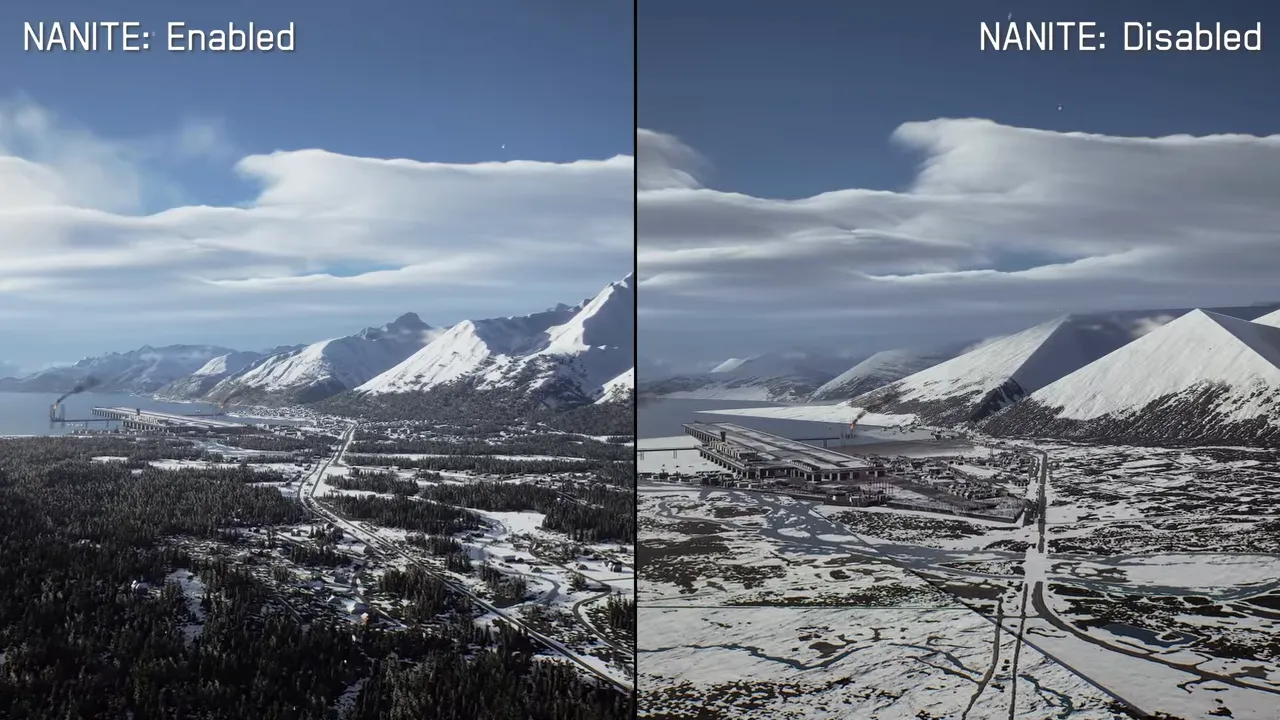
This is more than a technical feature added for its own sake. It directly improves the main perspective from which the game is played: moving quickly above large, detailed landscapes.
Nanite is not exposed as a normal user-selectable option. Disabling it through engine commands is a debugging experiment, not a recommended performance adjustment.
Detailed cities, aircraft and cockpits
The environments also hold up surprisingly well from low camera angles. Urban areas contain substantial building detail, rooftop equipment and high-quality shadows, even though normal play takes place far above them.
They are not built to the same standard as an environment intended for on-foot exploration, but they are more intricate than the usual flight perspective requires.
Aircraft receive similarly careful treatment. Geometry, textures, cockpit instruments and pilot equipment contain details that are difficult to appreciate from the standard camera positions. Some close-up inspection requires a third-party camera tool rather than an ordinary in-game feature.
That distinction is important: the detail exists, but the default camera does not provide unrestricted access to it. Cinematic cockpit shots offer a more natural opportunity to appreciate the work.
Lumen is reserved for non-interactive scenes
Ace Combat 8 does not use Lumen during normal gameplay. On versions that support it, the technology is instead used in the hangar and cinematics.
That selective use is sensible. Lumen lighting and reflections improve the cinematic presentation, but the implementation also introduces visible noise, shimmer and a substantial performance cost.
Keeping it out of combat protects the part of the game where stable rendering and responsiveness matter most. It also explains why a cinematic can run markedly worse than the mission that follows it.
The Soundtrack Is Central to the Campaign
Ace Combat 8’s audio is not merely a polished accompaniment to its visuals. It helps define the pacing, characters and emotional identity of the campaign.
The score contains almost 100 tracks, but its most important achievement is how individual pieces are used. Music is closely tied to takeoffs, encounters and shifts in tone.
Music can belong to the world itself
The opening carrier sequence establishes the connection between music and action. Early missions then draw on the orchestral sound associated with the series.
Mission three changes expectations by introducing Purple Magic Flight, a fictional band within the setting. A rock-loving wingman plays its music over the radio, turning the soundtrack into an expression of character rather than background scoring alone.
Enemy encounters use a related technique. The arrival of the Lux Lunae squadron is signaled by an unsettling radio chant that develops into a musical piece. The transition gives those appearances a distinct identity before the fighting fully unfolds.
Everflow and the wider soundscape
The main theme, Everflow, continues the series tradition of a signature composition for its largest dramatic moments. Longtime composer Keiki Kobayashi’s music remains an important part of that identity.
Surround sound, combat effects and voice acting complete the presentation. Together with the score, they make battles feel intense while giving the squad a memorable presence.
The audio’s strength is its integration. Music establishes momentum, effects convey the force of combat, and dialogue supplies the human stakes without pulling you away from flight.
Final Verdict: Excellent Aerial Action, Uneven Technical Delivery
Ace Combat 8 is a convincing evolution of the series. Stable, densely detailed terrain and more elaborate clouds improve the act of flying, while stronger character presentation and exceptional musical direction make the campaign more involving.
Its weaknesses are specific rather than incidental: soft performance-mode image quality, unstable cinematic frame rates, a demanding PC release and a heavily compromised Series S version.
For console play, PS5 Pro in performance mode is the clearest recommendation. Base PS5 and Xbox Series X remain good alternatives. PC is especially attractive for ultrawide users, provided its hardware demands and reported issues are considered first.
Choose the version carefully, and the central achievement remains intact: a campaign that turns aircraft handling, combat, dialogue and music into a cohesive, exhilarating experience.

You May Also Like

Aion 2 Review: Is It Worth Playing? Combat, Endgame, and Pay-to-Win Explained